

App Architecture
An application built on the Shopgate platform is a progressive web app (PWA) with a UI based on React that runs inside a React Native wrapper app. Native wrappers are available for iOS and Android so you can easily distribute your app on the Apple App Store or Google Play.
Shopgate provides ready-to-run default themes (the React app) for e-commerce applications. You can modify themes with Shopgate portals, or you can create custom themes that can be modified or completely replaced by custom themes.
The app frontend is based on JavaScript, and the frontend communicates to the native wrapper app through a system of commands and events.
The wrapper app displays a single full-screen web view, which is a browser window without any controls. The wrapper app loads the frontend of your app into the single full-screen web view.
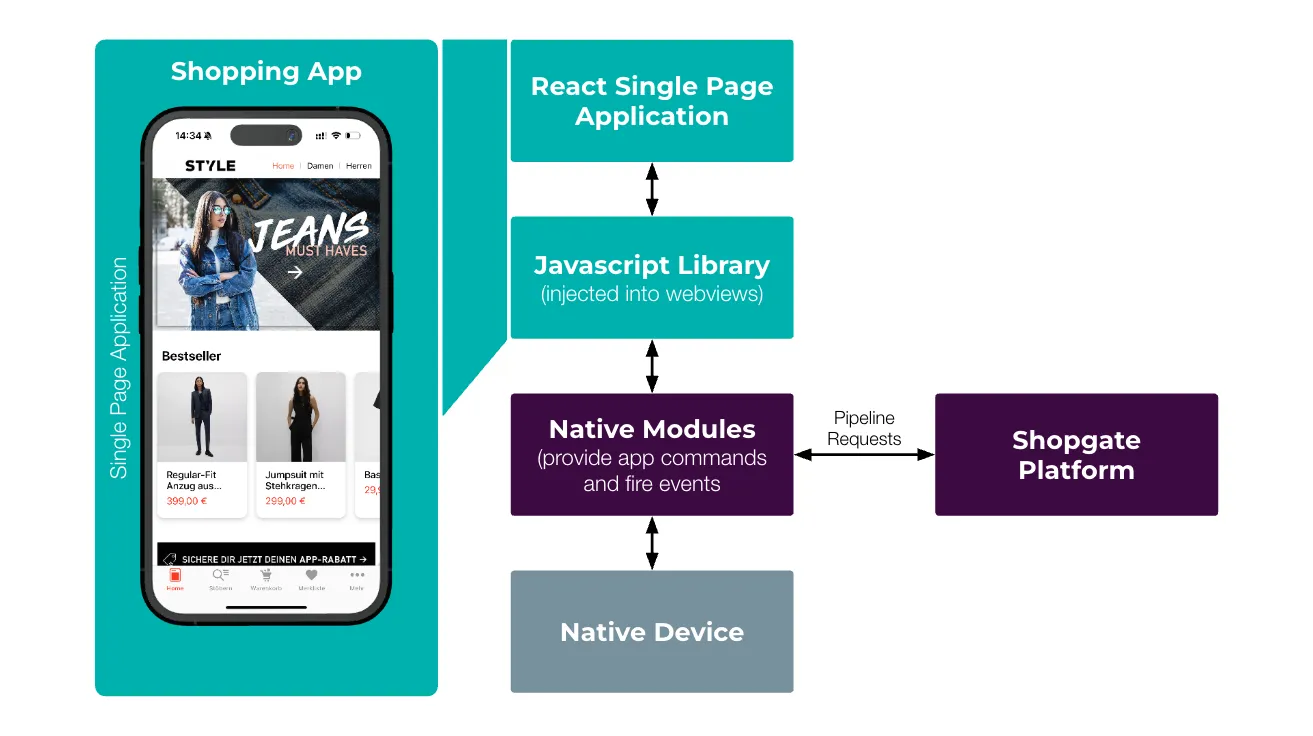
To communicate with the native parts of the app, a JavaScript library is injected into the web view. This library is connected to the native modules contained in the apps native code. By calling app commands and listening to events, the frontend can access native functionality, such as camera, brightness, and vibration, and can talk to native SDKs and frameworks.
Both the app frontend and native wrapper also connect to the backend infrastructure. The backend is based on micro-service architecture.
Backend Communication
Section titled “Backend Communication”You invoke actions and receive data from the backend through a pipeline request. The Shopgate platform includes many predefined pipelines, but you can alter the process logic of pipelines by developing custom extensions. Pipeline requests are named actions, such as getProduct, and they are similar to remote procedure calls with defined inputs and outputs. Pipeline requests are configurable and extensible.
Pipelines execute with a number of steps provided in JavaScript files. You can configure the order and input/output of data flow for each pipeline. Pipelines can take the output of a previous step and use it as input for the next step, or they can operate independently of the previous step.
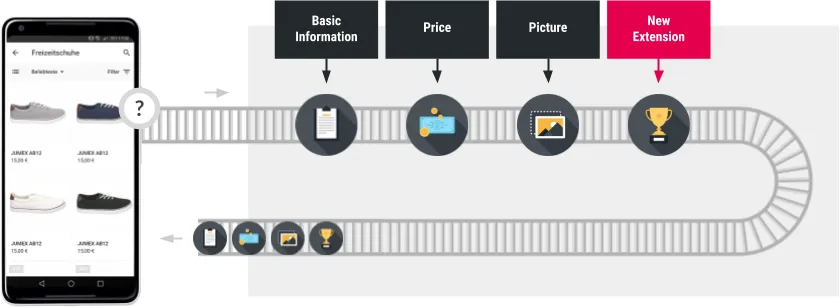
For example, the image shows the getProduct pipeline. The getProduct pipeline contains steps (in black boxes) provided by Shopgate. These steps return product information back to the app frontend. To add a bonus point provider, you can create a new step (the red box), which adds the bonus points data to the pipeline results. Add a custom React component on the frontend to display the new bonus points data in the app.
All backend processing is based on pipelines, which gives you the option to extend or replace all functionality with custom extensions.
Extending Your App
Section titled “Extending Your App”You can customize the frontend UI and the backend of your app when you use the Shopgate platform. You create code and configuration data bundled together as extensions that are installed by system integrators so that applications can enable the custom functionality.
Extensions for the frontend include widgets and portals. You can also use the theme extension type, which is a complete frontend application that maps to a certain device type. Extensions for the backend are extension steps and pipeline configuration files. You can use multiple extensions to build a pipeline.

For example, the getProduct pipeline contains a step to provide the main product information. You can also add a tax extension to calculate tax information, and then add a bonus point extension to add the number of bonus points.
Infrastructure Overview
Section titled “Infrastructure Overview”The Shopgate backend consists of a microservice architecture built with stateless container technology hostet in the cloud. Shopgate is optimized for high availability, scalability, and security. The following diagram shows the main components of the request flow.
Incoming requests from the app are load-balanced and served by an application proxy which routes them to one of the available containers dedicated for this particular app. Because you might have custom code running inside these app containers, they are located outside of the trusted zone (which only consists of Shopgate core components) and separated from each other.
Because all containers are stateless for easy scalability, the state of an app is maintained in our database. The high-performance database technology enables seamless scalability even across regions. The database is highly protected by a token-based authorization mechanism. The app proxy equips every request with an access token based on the current app, user, and session. The access token is passed to the database access layer, which then checks every single database interaction.