

Checklist: Integrate an E-Commerce Plattform
Please be aware that Shopgate APIs and imports are designed for fair usage. Please use the API responsibly and avoid sending excessive or repetitive requests that could be avoided. We reserve the right to limit or suspend access if unintended usage effects our service for others.
If you’re looking for a guidance which way you should use to i.e. implement the export, please contact our support. We also offer standard integrations for many major e-commerce platforms like Shopify, Shopware or Adobe/Magento.
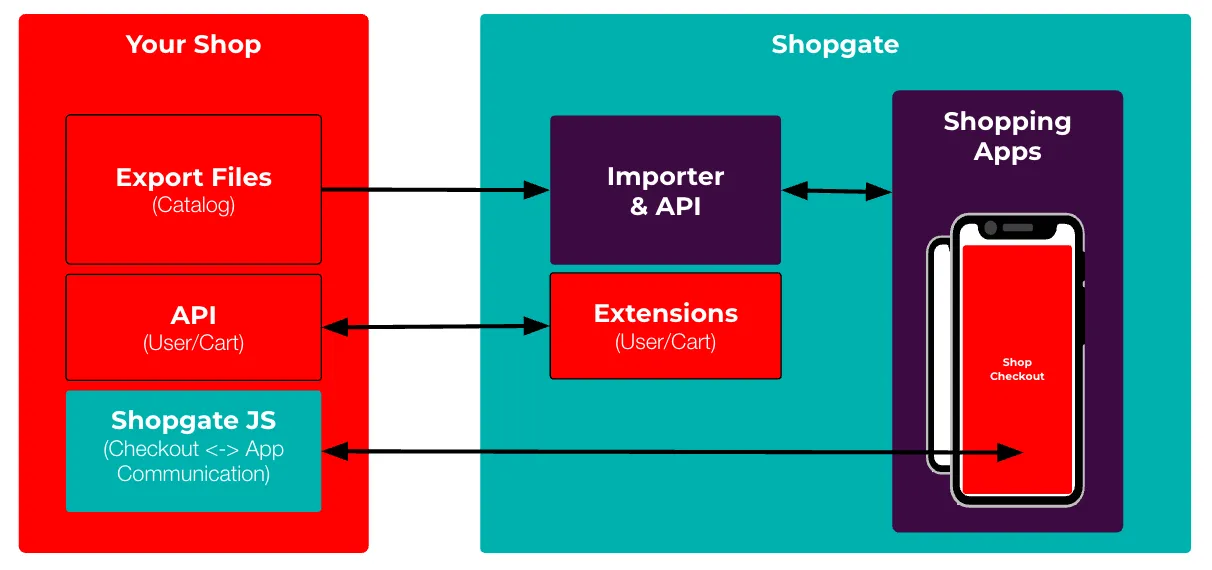
Minimum Requirements
Section titled “Minimum Requirements”In order to allow your customers to browse and buy products inside the app, these steps need to be completed:
Categories are shown in the app
Section titled “Categories are shown in the app”Ways of implementation:
Export of XML
Enables full feature set, full export files only, one file per language, import max. once per hour
Export of JSON
Via Shopgate Omnichannel services, enables full feature set, full & delta export files, content localization in one file, real-time-updates possible
Export of CSV
Via Shopgate Omnichannel services, limited feature set, see documentation for details
Real-time-Updates via API
Via Shopgate Omnichannel services, requires JSON export as full import
Products are shown in the app
Section titled “Products are shown in the app”Ways of implementation:
Export of XML
Enables full feature set, full files only, one file per local, import max. once per hour
Export of JSON
Via Shopgate Omnichannel services, enables full feature set, full & delta files, content localization in one file, real-time-updates possible
Export of CSV
Via Shopgate Omnichannel services, limited feature set, see documentation for details
Real-time-Updates via API
Via Shopgate Omnichannel services, requires JSON export as full import
Basic Web-Checkout Integration
Section titled “Basic Web-Checkout Integration”Cart and user handling, checkout and app communication have been implemented
Order and Customer endpoints
Section titled “Order and Customer endpoints”Add endpoints that provide required information for Shopgate to update the app dashboard. Use the Omnichannel API reference for your orders and customers responses.
Best App Experience
Section titled “Best App Experience”Our goal is to provide your customers the best possible app experience. Therefore we strongly recommend implementing these features.
Product reviews are available in the app
Section titled “Product reviews are available in the app”Ways of implementation:
Export of XML
Full Feature Set, full files only, one file per local, import max. once per hour
Third Party Review Source (via Extension)
In case your reviews are managed by an some third party provider, you can either check for already available integrations with our support team or implement your own extension by overriding/extending the review pipelines or render external/new content inside the app (example extension for rendering external reviews).
Favorite List Sync
Section titled “Favorite List Sync”Allow your customers favorite list(s) to be in sync with your ecommerce platform. Otherwise they are saved only in the Shopgate system.
Profile Pages / Order History etc.
Section titled “Profile Pages / Order History etc.”Ways of implementation:
Link profile pages
You can link all kinds of pages for logged-in users to your online shop pages. The pages are opened inside the app’s webview just like the web checkout. This is recommended when you have many custom pages but limited resources to rebuild all of them. Check the Webcheckout code examples below.
Build native profile pages
You can build your own pages for logged-in users inside the app using native frontends like your profile page & address book or build your own custom frontends with custom pipelines.
Allow app only offers
Section titled “Allow app only offers”Allow your marketing users to create app only offers like coupons or automatic discounts inside your e-commerce platform. You can detect app users via the user agent.
Code Examples
Section titled “Code Examples”Webcheckout
Section titled “Webcheckout”Check our Shopware 6 Webcheckout integration as an example integration:
Endpoints on shop-side: https://github.com/shopgate/shopware6-webcheckout
Utilities Extension: https://github.com/shopgate/shopware6-utility
User Extension: https://github.com/shopgate/shopware6-user
Cart Extension: https://github.com/shopgate/shopware6-cart
Favorites Extension: https://github.com/shopgate/shopware6-favorites
Web-Account Extension (link to i.e. order history): https://github.com/shopgate/web-account