

Overview
Content
Section titled “Content”About this guide
Section titled “About this guide”This guide covers the webhook feature of retail.red. It should deliver an overview what this feature is and how it works.
Introduction
Section titled “Introduction”The webhook service can call an external HTTP route upon certain events that occur on the Shopgate platform.
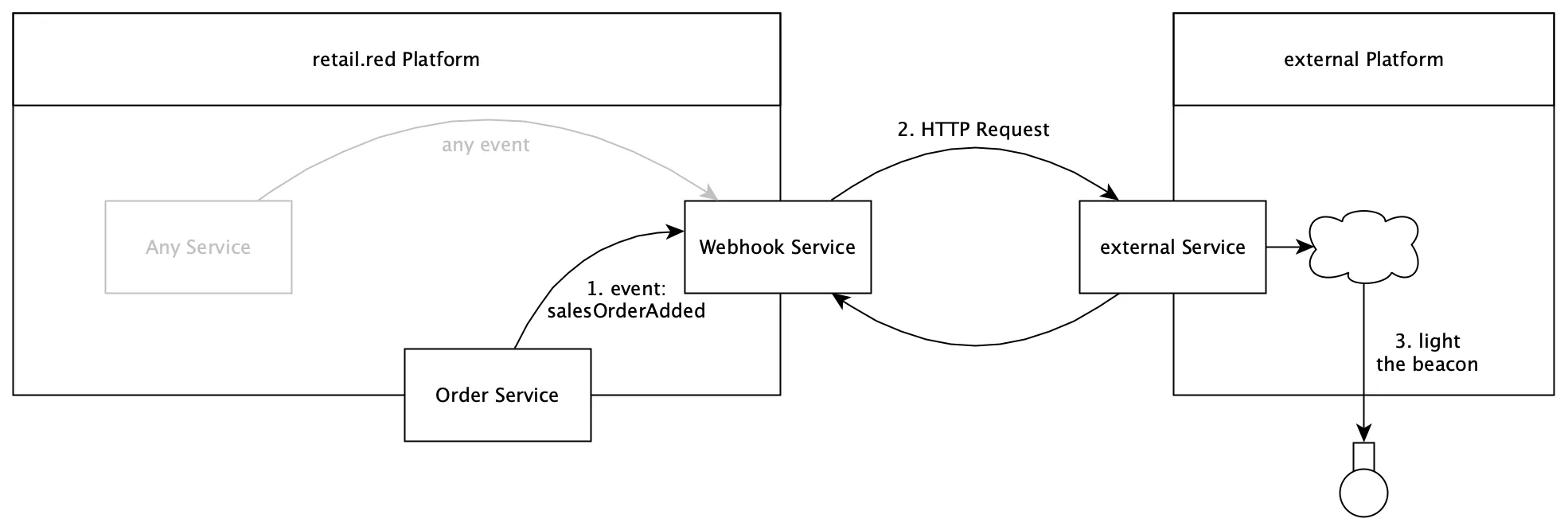
For example: a merchant can receive a HTTP call to a configured endpoint when a fulfillment order was added. The endpoint could then process this call and light a shiny red rotating beacon in the relevant location along with sounding a deep horn.
Which event should result in an HTTP call to which endpoint is configurable via the Webhook Service API.
Setup a Webhook
Section titled “Setup a Webhook”The setup of webhooks need to be done via the Shopgate webhook API.
-
Create Webhook with the relevant events to be sent to a given external endpoint.
-
Test the Webhook by triggering it manually.
Be aware that this call will only contain a sample payload which does not reflect the actual payload or its structure.
The Incoming Request
Section titled “The Incoming Request”Identification Token
Section titled “Identification Token”Every incoming request will contain an identification token (key: shopgate-token) in the request headers. This token can be used to verify, that the request originated from the Shopgate webhook API. The Webhook service has a route to get the webhook token. The token is unique for a marchant.
Allow List
Section titled “Allow List”In case an allow list is present at the external service the IP:
35.195.40.181for production,35.205.144.206for staging
must be added.
Body Structure
Section titled “Body Structure”All requests will have the content type application/json. The request body looks like this:
"id": "34caaaf2-15b5-4aca-8f71-dfd0b287b116", //request identification"date": "2021-03-02T10:52:20.952Z","webhookId": "f84ade20-46f3-4a30-b96f-834f7c411b5c", // identification of the webhook at the webhook service"webhookCode": "productCreatedMagento","eventCode": "productCreated","tenantId": "theMerchant#1","tenantType": "merchant","payload": { <payload depending on event>}See Available Events for the specific payloads.
Retry Mechanism
Section titled “Retry Mechanism”If a webhook request fails (does not response with proper 2xx, 301, 302, 303, 305, 307 or 308 response), the webhook service tries to send the request again. But instead of doing this immediately the webhook service waits a progressing timespan between the retries. The row of timespans is: 60, 180, 300, 600, 900, 1800, 3600, 7200, 21600, and 50400 seconds.
NOTE: The response should be send within a timeframe of 10 seconds. Otherwise the request will be retried.